
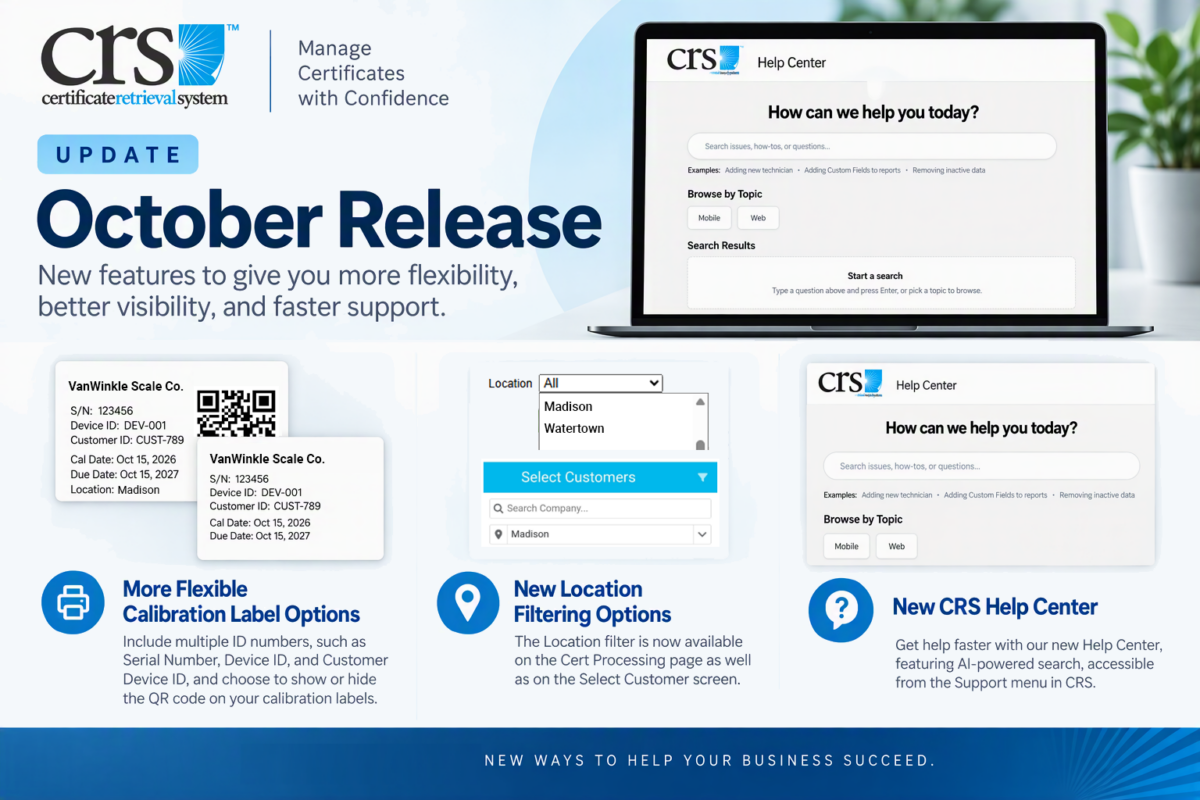
A new version of CRS is now available, with updates designed to give you more flexibility when printing calibration labels, make it easier to find devices by location, and provide faster access to help when you need it.
More Flexible Calibration Label Options
Include Multiple ID Numbers
Calibration labels can now include multiple ID numbers, such as the Serial Number, Device ID, and Customer Device ID, giving you more flexibility in how equipment is identified.
Show or Hide the QR Code
You can now choose whether to display the QR code on your calibration labels.
This provides greater flexibility for organizations who do not need QR codes to create a cleaner, simpler label.
Add Location to Calibration Labels
The device Location field can now be displayed on calibration labels, making it easier to identify where a device belongs directly from the printed label.
New Location Filtering Options
We’ve expanded the use of the Location filter to more screens in CRS, making it easier to identify for companies with multiple service locations.
The Location filter is now also available on:
- Cert Processing
- Select Customer
New CRS Help Center with AI-Powered Search
Getting help in CRS is now easier with the new CRS Help Center, available directly from the Support menu in CRS Web.
The Help Center includes AI-powered search, allowing you to ask questions or describe what you are trying to do and quickly find relevant help content.
Whether you need instructions for completing a task, configuring CRS, or learning more about a feature, the new Help Center provides a convenient place to find answers within CRS.