
Skip to content
Certificate Retrieval SystemCertificate Retrieval System
  • Home
  • Features
  • News & Updates
  • Our Company
  • CONTACT US
  • REQUEST A DEMO
News

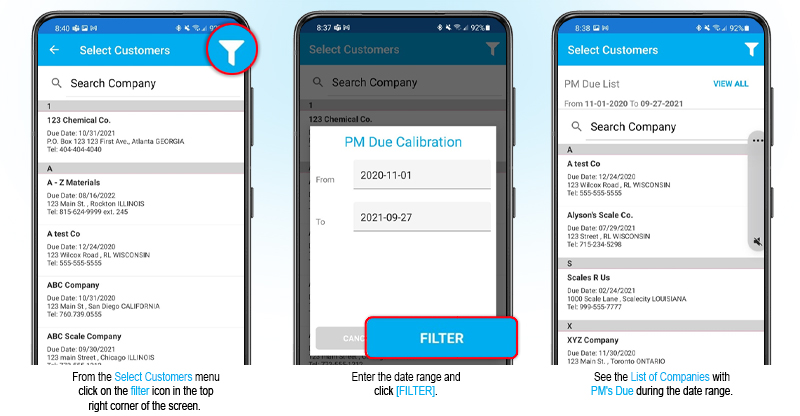
PM Due List Now Available on the CRS Mobile App
Posted on December 22, 2021May 16, 2022 by Andrea Goliger

Check out the new PM Due Customer List which is now live on your CRS mobile app. This new feature makes it easier to keep track of which scales are coming due for preventative maintenance or calibration.

Important Notice for all CRS Version 5 users.
Enhanced Security on CRS Web and Mobile
LATEST POSTS
  • CRS Web Update
    Certificate Retrieval System (CRS) New Features for the scale industry

    A new version of CRS is now available, introducing several enhancements designed to improve efficiency, including bulk NIST certificate updates for weight kits, optional customer notes on the Customer List, and expanded data cleaning tools. The next time you log in to CRS Web, you’ll see these updates. Batch Update Weight Kits to a Renewed NIST CertificateManaging renewed NIST certificates is now faster and easier. Instead of updating weight kits one at a time, users can now update all weight kits associated with the same expired NIST certificate in a single batch.To use this feature, select the expired NIST certificate to view all linked weight kits, then choose the new renewed NIST certificate that will replace it. Once you click Update, CRS will automatically update all associated weight kits to the selected certificate. Display Notes in the Customer ListA new configuration option has been added that allows customer notes to be displayed directly on the Customer List page, making it easier to view important customer information without opening individual customer records.To enable this feature, navigate to: Admin > Configuration > Customer Setup > Display Notes in Customer ListWhen enabled, a Notes column will be added to the Customer List, displaying customer notes alongside other customer details. This provides quick visibility into important information such as account instructions, special requirements, reminders, or service-related notes. Data Cleaning: Remove Disabled Weight KitsThe Data Cleaning utility has been enhanced to include Disabled Weight Kits as a cleanup option for administrators.To help keep your CRS database organized and free of obsolete records, administrators can now remove disabled weight kits from the system. This new option is available alongside existing data cleaning tools for items such as Technicians, Certificates, and Scales.To access this feature, go to: Admin > Data CleaningNote: This feature is available to users with Administrator privileges only. Unlimited Build-Up Test ReadingsCertificates now support an unlimited number of readings for Build-Up Tests. Previously, the number of readings that could be included in a Build-Up Test was limited. With this change, users can record and report as many readings as required, providing greater flexibility for complex testing and calibration procedures. Measurement Uncertainty and Pass/Fail by Test Point A new option has been added to enable this feature. When enabled, the applicable certificates have been enhanced to display Measurement Uncertainty (MU) and Pass/Fail results for individual test points. This update includes changes to the certificate layout to support: Pass/Fail results for each line within Shift Tests and Test Point sections Measurement Uncertainty (MU) calculations at the individual test point level Automatic conversion of MU values to the scale’s Unit of Measure (UOM) to meet NISTIR 6919 requirements Improved visibility of compliance and tolerance results throughout the certificate To enable, go to: Admin > Forms. Set-up on each individual form as needed using the Show Measurement Uncertainty On Certificate setting.  Enhanced Support for Multi-Range DevicesCRS supports multi-range scales ensuring the system will display the correct division sizes for the various ranges set on the scale.  The lower range will always be used when setting the correct division size to use for each load test point.

    [...]
  • Data Cleaning

    Data quality is a key factor in your CRS system.  To keep your data clean, you can remove inactive or obsolete data including old certificates past their storage date to stay within your CRS file storage limit. With the CRS web Admin interface, go to the Admin menu and choose Data Cleaning. The items that can be addressed in Data Cleaning include: Technicians:Select the Technician name you wish to delete. Replace it with another technician’s name. Equipment Conditions:Select the Scale Type, then the Equipment Condition you wish to delete. Replace it with another equipment condition. Certificates:Select the Customer(s) and then choose the cut-off date.  Certificates older than your chosen date will be deleted. Customers:Select the Customer you wish to delete. Scales:Select the Scale you wish to delete. Weight Kits:Select the disabled Weight Kits to delete. Note: Deleted data is permanently deleted.

    [...]
  • Assign one or more state certification licenses to your technicians in CRS.

    If your technicians are licensed in multiple states, you can add multiple license numbers to each technician record and set the preferred default.  When performing the calibration, the technician can select the appropriate license number to appear on the certificate. Available both for the web and mobile apps. In CRS Admin: From the Admin menu, select the Technicians option. Click Edit next to the technician’s name and enter the license numbers.  Mark one as the default license.  The license numbers will then be available to the technician for selection when completing their calibration certificates.In the CRS App: When performing a calibration, the technician can select the appropriate license number.

    [...]
  • CRS Version 8 Now Available
    Certificate Retrieval System (CRS) Version 8

    We’re excited to announce that a new version of our app is now available! The new app uses the very latest in mobile app technology and marks a significant reinvestment in CRS, ensuring future-forward compatibility and enabling faster updates and feature rollouts. The next time that you login to your mobile app on iOS, Android or Windows, it will update automatically. Included in this release and on the web: Highly requested feature! Added the ability for users to add Manufacturers to the global list in crscerts.com. To add a manufacturer go to Admin -> Manufacturers. Before adding a new manufacturer, please check the list carefully to ensure it is not already included under an alternate spelling. Improved user experience with enhanced color schemes for better readability. Added a tolerance graph to clearly visualize target and tolerance limit values. Included easier map access. Added editable Test Procedure fields for Generic Devices in the mobile app. Resolved issue which was not allowing users to enter strain test values causing a warning message to trigger. Resolved input validation issue on mobile app to ensure entered values are compliant with the scale increment value. Resolved display issue to ensure readings display the number of decimal places equal to the number for the scale increment. Resolved issue where the Load Test ‘Section’ fields were displaying differently for certificates created from the mobile app compared to the web interface. Resolved issue with the Celsius to Fahrenheit conversion calculation in the environmental conditions. Resolved the issue with warning message on valid weight values on strain tests.  

    [...]
  • How to Move Scales Between Customers in CRS

    From the Admin menu, select the Move Scales From the Move Device Page, select the ‘From’ customer and the ‘To’ customer. The list of scales belonging to the From customer will appear below. Click either the All option to select all scales, or click the Select option to check off individual scales from the list to move. Click the [Update] button to move the scales.

    [...]

info@nexent.com

Newsletter

Join our mailing list to stay up-to-date on our new releases and promotions, as well as helpful resources relevant to the field service industry.

SIGN UP

Contact us
to schedule your demonstration

REQUEST A DEMO

How can Certificate Management Software help your business?

LEARN MORE

Since 1994, Nexent Innovations Inc. has provided business solutions for thousands of field service clients in over 45 countries around the world.

Our clients are the key to our success. And our commitment to you is that our products will provide the best value for your service management software dollar.

Industry Information
  • CRS Web Update
  • Data Cleaning
  • Assign one or more state certification licenses to your technicians in CRS.
  • CRS Version 8 Now Available
Contact Us

1-866-463-9368 (North America)

(Direct) 1-905-206-1828

info@nexent.com


Newsletter

Join our mailing list to stay up-to-date on our new releases and promotions, as well as helpful resources relevant to the field service industry.

SIGN UP
 

Terms and Conditions | Privacy Policy

© 2026 Nexent Innovations Inc. All Rights Reserved

  • Home
  • Features
  • News & Updates
  • Our Company
  • CONTACT US
  • REQUEST A DEMO
  • Newsletter